
The SCAIL Pose Animation Workflow leverages the newly released SCAIL model to deliver production-level pose animation with exceptional realism, without compromising on speed. This workflow is designed to imitate poses, tiktok dance movements, and body actions from a driving video and accurately transfer them onto a reference character or image.
With a simple setup, you can generate high-quality animated videos that capture the movement, rhythm, and flow of the original performance. Just upload a pose or dance video, add a reference image, set the frame count, and click Queue—the workflow takes care of the rest.
Key Features:
🕺 Advanced Pose & Dance Animation – Accurately copies poses, body movement, and motion dynamics from the source video.
🎥 Production-Level Quality – Clean motion, stable frames, and realistic animation output.
⚡ Fast & Efficient – Optimized for speed while maintaining high visual fidelity.
🧠 Context Support for Longer Videos – Enables longer animations (with minor trade-offs in outfit or character fidelity in some cases).
🔄 WAN Alternative for Pose Animation – Outperforms WAN in pose-driven animation tasks and serves as a strong replacement.
🎭 Creative Freedom – Works well for dancing, acting, performance videos, and expressive motion scenes.
How to Use:
1️⃣ Upload a pose or dance video (driving video)
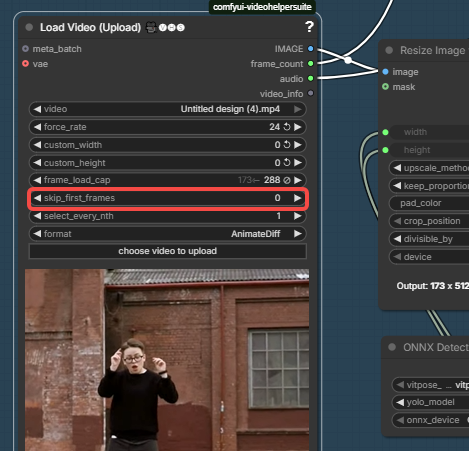
skip_first_frames
This parameter controls how many frames are skipped at the beginning of the video.
- Set this to 0 if the video should start from the very beginning (recommended).
- Increase this value only if you intentionally want to skip the first few frames (for example, to remove a black screen or intro).
⚠️ Important:
If this value is set too high, all frames may be skipped and you will see the error “No frames generated”.
If you encounter “No frames generated”, please check this setting first and make sure it is 0, especially when loading a short video.
2️⃣ Upload a reference image of the character
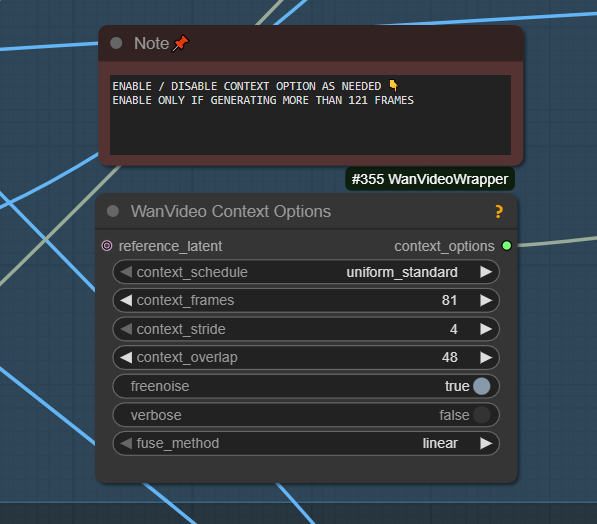
3️⃣ Set the desired frame count - use CONTEXT VIDEO OPTION only in case of longer frame counts.
4️⃣ Click Queue and generate your animated video
5️⃣ Recommend ULTRA PRO GPU for best results and to avoid out of memory errors
Usage Notes:
- Context mode allows longer generations but may slightly affect character or clothing consistency.
- Ideal for dance videos, acting performances, pose imitation, and animation experiments.
- Recommended to experiment with different frame counts and context settings for best results.
- First run will be slow, kindly be patient.
Bring performances to life with the SCAIL Pose Animation Workflow—a fast, powerful, and reliable solution for high-quality pose and tiktok dance animation inside ComfyUI.