Learn what Z-Image is—an efficient open-source AI model set for image generation—and how to train custom LoRAs on its Turbo version using AI Toolkit on MimicPC.
In the fast-paced world of AI image generation, a new contender has emerged that's turning heads and sparking a massive wave of excitement: Z-Image from Alibaba's Tongyi Lab. Just weeks after the open-source release of Flux 2, Z-Image has blown past it with vastly superior performance in photorealism, speed, and versatility—all while remaining fully open-source. This isn't just an incremental upgrade; it's a revolution that's got developers, artists, and AI enthusiasts buzzing, as Z-Image delivers stunning results that outshine competitors in benchmarks and real-world tests.
If you're diving into open-source image models, this guide will walk you through Zimage Turbo's powerhouse features, its efficient distillation process, and how to train custom LoRAs with AI Toolkit without sacrificing speed.

What is Z-Image? A High-Performance Open-Source Image Generation Model
Z-Image is a powerful and highly efficient image generation model with 6B parameters, making it smaller and faster than competitors like Flux (12B) and Flux 2 (32B). Released by Alibaba's Tongyi Lab team, it's an open-source model designed for speed and versatility.
What sets Z-Image Turbo apart is its ability to generate high-quality images in just 8 steps, in a single pass, without needing Classifier-Free Guidance (CFG). This results in incredibly fast and lightweight inference—think sub-second latency on enterprise-grade H800 GPUs, all while fitting comfortably within 16GB VRAM on consumer devices.
Z-Image Variants: Tailored for Specific Use Cases
Currently, there are three variants of Z-Image, each tailored for specific use cases:
- 🚀 Z-Image Turbo: The distilled version that's the star of the show. It matches or exceeds leading competitors with only 8 NFEs (Number of Function Evaluations). It shines in photorealistic image generation, bilingual text rendering (handling English and Chinese seamlessly), and robust instruction adherence. If you're looking for speed without sacrificing quality, this is your go-to. Imagine generating stunning, realistic images in under a second—perfect for real-time applications.
- 🧱 Z-Image Base: The non-distilled foundation model. By releasing this checkpoint, the team aims to empower the community for fine-tuning and custom development. It's ideal if you want to build from the ground up without the distillation optimizations.
- ✍️ Z-Image Edit: A variant fine-tuned specifically for image editing tasks. It supports creative image-to-image generation with impressive instruction-following capabilities, allowing precise edits based on natural language prompts. Whether you're transforming photos or adding creative twists, it understands bilingual instructions for flexible, imaginative results.
Key Features and Performance Highlights of Z-Image
- Photorealistic Quality (Z-Image Turbo): Delivers strong photorealistic image generation while maintaining excellent aesthetic quality. From lifelike portraits to detailed landscapes, it rivals proprietary models.
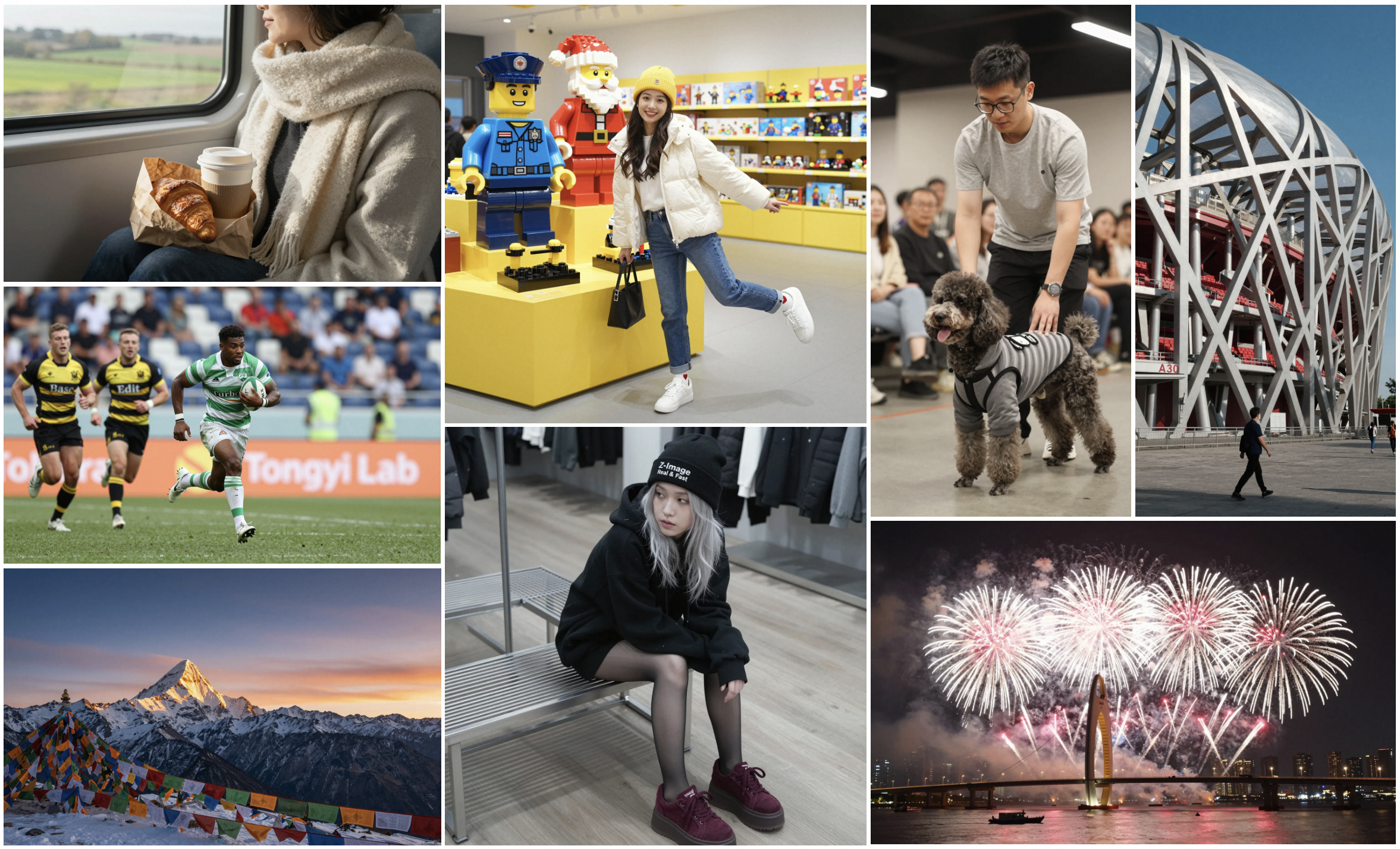
- Accurate Bilingual Text Rendering (Z-Image Turbo): Excels at rendering complex Chinese and English text accurately. This makes it invaluable for multilingual projects, like generating posters or graphics with embedded text.

- Prompt Enhancing & Reasoning: Built-in prompt enhancer adds reasoning capabilities, allowing the model to go beyond surface-level descriptions and incorporate underlying world knowledge. This leads to more intelligent and context-aware generations.

- Creative Image Editing (Z-Image Edit Variant): Shows a strong understanding of bilingual editing instructions, enabling imaginative and flexible image transformations. Perfect for artists and designers tweaking visuals on the fly.

Performance Benchmarks
According to Elo-based Human Preference Evaluation on Alibaba AI Arena, Z-Image Turbo delivers highly competitive performance against other leading models. It achieves state-of-the-art results among open-source image generation models, often outperforming in speed, quality, and efficiency. If you're tired of resource-heavy models, Z-Image Turbo's 6B parameters make it a lean, mean generating machine.

Ready to dive in? Come experience Z-Image Turbo with our pre-deployed ComfyUI templates—we've set everything up for you, so you can start generating without any hassle!
Overcoming Training Challenges in Z-Image-Turbo
Z-Image-Turbo is a distilled model, trained via a student-teacher method to produce high-quality images in very few steps (like 8, without CFG). This distillation is what gives it that "turbo" edge—fast inference without the bloat. However, this comes with a catch: You can't train Z-Image Turbo like a standard diffusion model.
If you attempt direct training in the usual way:
- The model gradually loses its Turbo behavior.
- It starts requiring more steps and CFG for good results.
- The core advantage of 8-step, no-CFG inference gets destroyed.
To solve this, the AI Toolkit author developed a specialized "training adapter LoRA." Here's how it works:
- Attach this adapter during training.
- Train your custom LoRA (e.g., for characters or styles).
- Preserve the original Turbo performance, ensuring fast 8-step generations remain intact.
This D-Distillation training adapter is built right into AI Toolkit. Simply select Z-Image Turbo as your model, then choose the matching adapter (e.g., Z-Image Turbo adapter v1).
Limitations & Notes
The adapter isn't a permanent fix—it's designed to slow down distillation breakdown, not prevent it entirely. If you push training to extreme levels (millions or tens of millions of steps), the Turbo qualities will still degrade over time.
Recommended Usage:
- Great for: Character LoRAs, style LoRAs. Stick to 5k–20k steps for safe, effective results.
- Not recommended for: Massive full finetunes with millions of images (e.g., a 5M-image dataset overhaul).
By using the adapter wisely, you can create custom models that retain Z-Image Turbo's speed while adapting to your needs.
How to Train Z-Image-Turbo in AI Toolkit
Ready to train your own LoRA on Z-Image-Turbo? AI Toolkit makes it straightforward. Follow these steps to prepare, configure, and execute training while preserving Turbo performance.
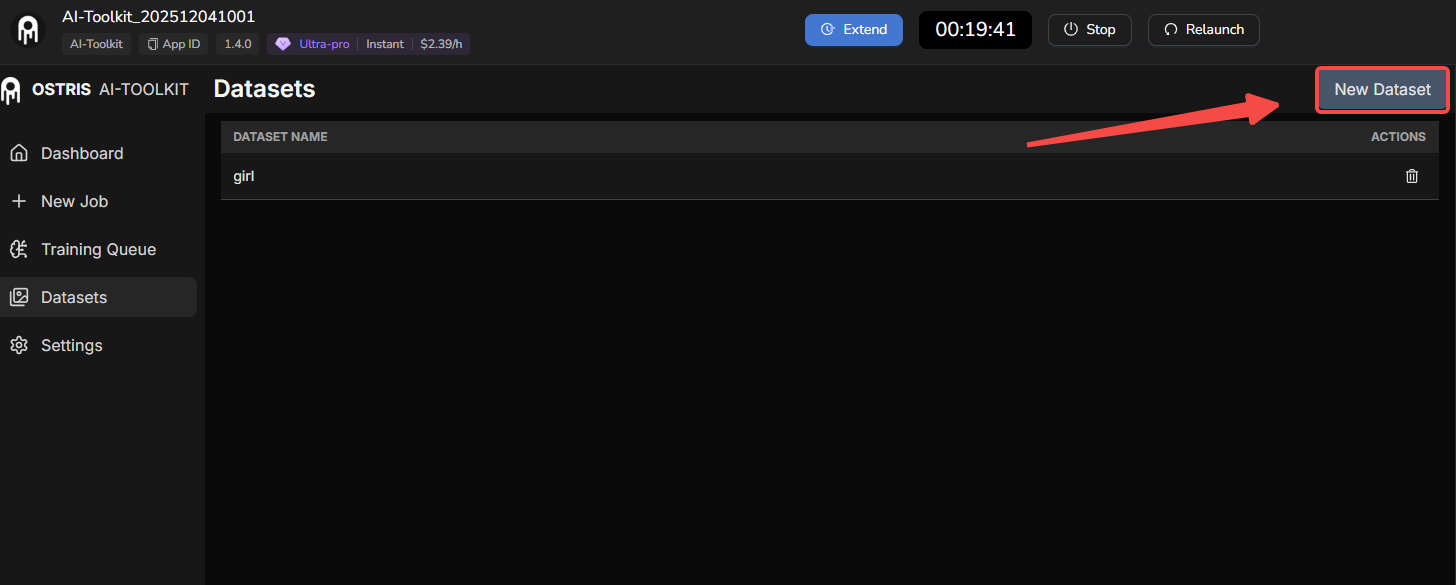
Prepare Your Dataset
- Prepare your training images (for example, character images or style examples).
- Upload your images into AI Toolkit.
Key Training Settings in AI Toolkit
- Model selection
- Choose the Zimage Turbo architecture in AI Toolkit.
- Training adapter
- In the “Training adapter” field, select the built‑in
Zimage Turbo adapter v1.
- In the “Training adapter” field, select the built‑in

- Steps & Learning Rate
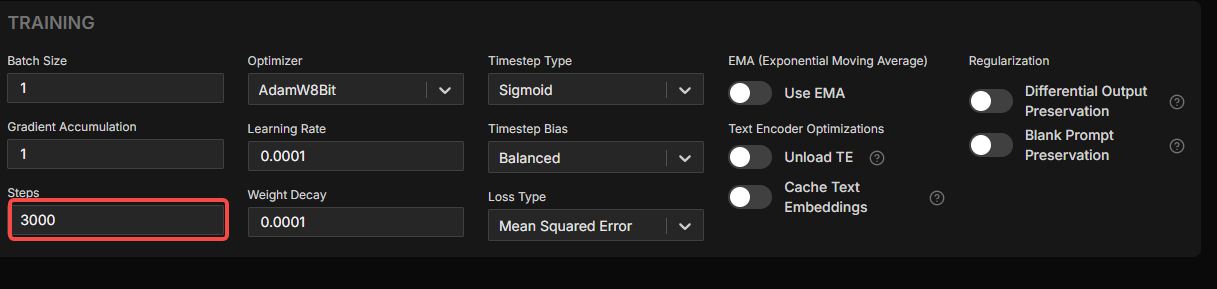
- Training steps:
- A good example setting is around 3000 steps (you can adjust based on your dataset size and goals).
- Learning rate:
- Use 1e-4 (1E-4).
- Do NOT use 2e-4 — users have reported that 2e-4 can explode the model.
- Sampling steps & CFG settings
- Keep the Turbo defaults during training:
- Sampling steps: 8
- Guidance scale: 1
- Do not change these; we want to preserve the Turbo behavior (8 steps, no CFG).

- Advanced Option (Optional) – Differential Guidance
You can enable the experimental Differential Guidance:
- Goal:
- Reduce “over‑averaging” during training.
- Make the learned character/style closer to your real target, instead of a blurred or averaged version.
- Idea (high level):
- Similar in spirit to CFG: it works with the difference between the current prediction and the target.
- That difference is amplified and added back, instead of only doing tiny incremental updates.
- Recommended config:
- Set guidance scale = 3.
- Status:
- This is experimental and completely optional.
- You can leave it off if you prefer a more standard training setup.

Conclusion: Why Z-Image Turbo is a Must-Try for AI Image Generation
Z-Image-Turbo redefines what's possible in open-source image generation, blending speed, photorealism, and ease of use. By following this guide, you can train custom models in AI Toolkit without losing its turbo advantages. Whether you're generating bilingual text, editing images creatively, or building styles, it's a powerhouse tool.
Ready to get started? Come use our pre-installed Z-Image-Turbo ComfyUI template—no downloads or setups needed, just start generating right away. And if you want to train LoRAs, leverage our cloud-based AI-Toolkit for seamless, hassle-free training.